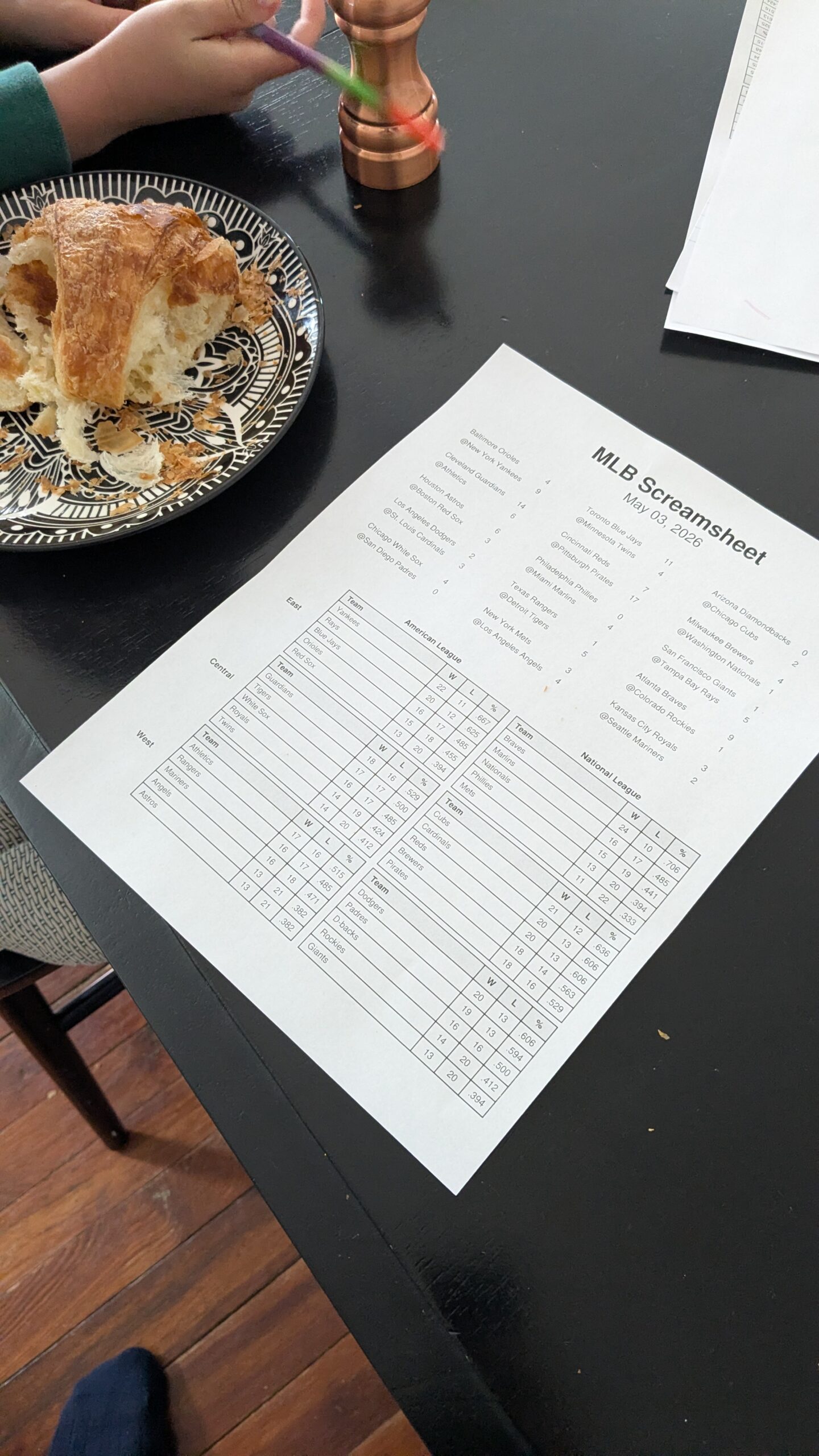
Mid-year 2025, my son became obsessed with Major League Baseball. He had started playing Little League the year before, and we had seen a couple of Phillies games, but suddenly he was hooked on the progress of the season.
There was just one problem: my kid is a screen hunter.
When he wakes up in the morning, he hunts for the TV remote. If he can’t find that, he hunts for the Nintendo Switch. Then the tablet, the computer, my phone, and my wife’s phone. You get the idea. He’s on the hunt.
We’ve been trying to address this because once he gets on a screen, getting him off is nearly impossible. It usually leads to a “verbally violent” outburst-from him, not us-and he stays a bit of a jerk for a while after.
My wife and I call it “screen withdrawal,” and with our two boys, it feels very real.
The baseball scores became a flashpoint. I wanted him to follow the scores; it’s an innocent hobby, there’s math involved, and it’s the National Pastime. But I didn’t want him looking at a screen to get them.
The “Screamsheet” Solution
My first workaround was digging into the scores myself and dictating them to him, but that’s a hassle when you’re trying to get breakfast on the table and kids out the door for school.
Then I tried supervised screen time, but the second I turned my back, he’d drift from baseball highlights into the typical “junk” on YouTube. The algorithms don’t care about your age; they only care about keeping you watching.
Then I remembered something from my childhood. I used to be into cyberpunk role-playing games-not even playing them, just delving into the worlds they created. I remembered a futuristic item called a “Screamsheet.” The idea was basically a high-tech fax machine: you put in a buck, it prints out a sheet with the latest headlines, you read it, and you toss it away. I thought: Wouldn’t it be great to create a Screamsheet for baseball? A physical page that prints every morning, ready for my kid to read like his own little newspaper.
Building with the “Vibe”
I decided I wasn’t going to program this all by myself. I was going to get AI to do the heavy lifting. I fired up Gemini and told it what I wanted: a morning summary of yesterday’s games, who won, the scores, and a chart of the current standings.
Gemini spit out the Python code. I stuck it in a GitHub repository and started running it. It uses an online API (MLB Stats) to pull the data, assembles it into tables, creates a nicely formatted PDF, and drops it into a folder.
The last mile was the hardware. We have one Linux box in the basement connected to a printer. I used Gemini to help me write a simple Bash shell script and a “cron job” that tells the computer to run the program and print the file automatically at 6:00 AM.
The Result: A Silver Bullet
The first morning it worked, I heard the printer running at 6:00 AM on the dot. I ran downstairs, grabbed the sheet, and put it on the kitchen table. My son came down, saw it, and just started reading while eating his breakfast. He didn’t say a word, but he also didn’t hunt for a screen.
Then he told me “Dad, the Brewers are the top team” (he likes poking at my Wisconsin heritage).
But I didn’t care about the Brewers at that minute – Team Parents had won this game!
Since then, I’ve embellished it. If the Phillies played, the back of the sheet now features a full box score and a “journalistic blow-by-blow” generated by the Grok API.
I even modified the prompt to match my son’s morning mood: if the Phillies (or whatever team you pick as your favorite) lose, the AI is instructed to write the summary like a local fan who is absolutely fed up-just totally throwing the team under the bus and ready to chuck a cheesesteak at the wall. Matching his “energy” has actually helped my boy commiserate and get a kick out of the loss instead of just losing it himself.
Expanding the Feed
Once the season ended, I kept the habit going with MLB trade rumors so he could read about how teams were transforming in the off-season. Now, I’ve expanded the system to include:
- NHL and NFL scores.
- The Presidential Screamsheet: A morning scan of news sites and WhiteHouse.gov, summarized by AI into stories under 200 words.
- The Sky Tonight: A front-page star chart with an LLM-generated “reenactment” of Star Hustler’s Jack Horkheimer describing the night sky, plus horoscopes for my wife and me.
Making Technology Invisible
The point of all this is that I’ve taken advanced technology – Large Language Models – and used them to make technology disappear. Instead of sifting through an infinite scroll of noise and being held hostage by an algorithm, we’re reading good old-fashioned paper. The computer is now an invisible aspect of our morning.
This personal project actually mirrors a larger movement happening in my own community right now. My wife has been active in the Lower Merion School District board meetings, where a growing group of parents is pushing for a “Bell to Bell” phone ban and the right to opt-out of 1:1 tablet use in favor of Pencils Over Pixels.
My goal is to use AI to make technology as invisible to my eyes as possible so I can regain my concentration and attention. I can force these tools to give me exactly what I want to see and hear, and nothing else.
I’ve posted the link to the code below. It’s all on GitHub – feel free to fork it and make it your own. It includes architecture diagrams and READMEs so your own LLM can read the docs and help you extend it to whatever you’re interested in.
If you have questions on the setup or suggestions for new sheets, drop a note in the comments!
Leave a Reply