Author: Peter

  • Context Switching into Oblivion:  How to Manage Multitasking in the Agentic Era

    Context Switching into Oblivion: How to Manage Multitasking in the Agentic Era

    When I first started this blog about 50 years ago, I thought about writing an article about multitasking. To be precise, about how multitasking is a myth.

    There is no multitasking, there is only rapid context switching. And that quickly exhausts someone with a short attention span.

    The punchline was, work on one thing for a while and don’t switch contexts until you’re done.

    Well, this same problem has surfaced in the age of agentic engineering.

    At first, telling a LLM agent like Claude or Codex about the program you wish you could have, then having them build it, feels like a superpower. All of a sudden, projects that felt like a pie in the sky are now possible to build TONIGHT.

    “I’ll build more projects!” Now you’re spinning up several agents at a time, each working on something different. My God, you think, I can build anything!

    And then you start hitting the wall. “What was this one doing?”

    Personally, I tend to start feeling like just sitting and staring out the window, to let it all settle down. But the urge to keep telling these agents what to do is almost irresistible – they don’t work until you tell them what to do. The bottleneck is my instructions!

    There are a lot of words for this, like “infinite backlog”, “prompt fatigue”, or “agentic scope creep”. But it’s nothing more than rapid context switching – classic multitasking.

    Let’s break down exactly why this artificial multitasking is bankrupting your focus, and look at some engineering constraints you can use to stop it.

    The Tax

    Psychologists have studied the process of context switching in humans since the late 1900s. Most of these studies involve people performing one task, switching to another, then switching back to the original.

    For example, people were studied while reading numbers off a page in their native language, then in a second language, then back again in their native language. The researchers found that, not only did they take a longer time to recite in their second language, but they took even longer still when they flipped back to their mother tongue.

    This lengthening of the amount of time to do something was termed the cognitive tax. It’s the result of the mind having to take several steps when moving attention from one task to another.

    1. Goal Shifting – new task requires a new objective
    2. Rule Activation – new task requires different skill set

    The price of context switching can be less than a second, but if you’re switching over and over, it adds up. Plus, it takes mental effort to perform those two steps.

    Double Taxed

    For those of us with ADHD, the tax can be an especially heavy burden. I wrote a while back about how the ADHD brain works. It takes extra effort to activate interest in someone with inhibited executive function. This is why it’s generally hard for us to focus in places like school or meetings. But when something is especially interesting, we get engaged. With only a little more energy, we get so engaged that the entire world can melt away – this is the state of “hyperfocus”.

    Programming a computer can be very effective in inducing hyperfocus. Small, incremental changes layer on capabilities, and it feels a little like the perfect transparent medium for creativity to manifest.

    Now, say we get interrupted in the middle of a hyperfocus session. That attention immediately drops below the threshold, and we must now struggle to get interested and engaged in the new activity. That’s not to say we don’t like to chit chat, we do! But when we try to get back to the former activity, it can be extremely hard to get back over that interest threshold, not to mention going back into a hyperfocused state.

    The feeling of productivity that comes from repeatedly prodding multiple AI agents to do more work is an illusion. The agents are doing the work. You are spending a limited tank of energy that isn’t getting replenished, and burning loads of extra ATP (the brain’s energy source) on just the switching part. Eventually, you’ll get zonked, frustrated, and possibly hit melancholy.

    How to Manage Agent Number One

    So how do you deal with this? Give up and become a painter? Gallons of Red Bull?

    There are a few strategies that all can work together, which I’ll list below. But the most important thing to realize is that the old way of programming is gone. Over are the days of the coding hero. Nobody can code more efficiently than an AI agent.

    But that means that the programmer’s job has changed, and in a way that benefits those of us that can hit hyperfocus more easily.

    Here are a few strategies I’ve found to be most important, in this new agentic era.

    1. Write Full Requirements Documents

    As soon as the first steps of a major programming project are imagined, the ADHD brain wants to start smacking down some for loops and lambda functions. But that’s a trap.

    Modern LLMs have huge context windows, and they’re getting bigger all the time. Perhaps there will be a limit in the future, but right now they’re big enough for anything you would want to write to them.

    For example, Claude Opus 4.7 can fit a million words into its context window. That’s War and Peace by Leo Tolstoy. The latest Grok model (4.20) can fit two million – that’s Harry Potter. The entire 7 book series. The effective window is about 60% the maximum number of tokens, but that’s still more than you’re likely to write into the prompt window.

    What this means is, you can throw a complete requirements doc into the LLM, and it won’t flinch.

    Instead of taking the time to write code, your job is to instead spend that time writing the requirements doc.

    1. Write the Requirements with LLMs

    And, since LLMs are so great at taking a rough idea and smoothing it out into prose, you can go back and forth with the LLM refining the requirements doc.

    Spend 10 minutes yapping into a recording device to flesh out your idea. Just say everything that comes to mind about your idea, including the kind of toilet paper you’re about to use (we know where you use your phone). Then dump that into Gemini and ask it to convert it into a first draft.

    Then, read through it and flag things you think sound off, or missing, or just not what you want. Then, stick that version back into the LLM and tell it to rewrite. Then, stick the doc back in, and tell the LLM to find the problems. Here’s a prompt:

    Act as a strict QA engineer and technical product manager. Review the attached requirements document and identify every area that is fuzzy, ambiguous, or prone to edge-case failures.
    
    Specifically, flag any requirement that lacks clear constraints or cannot be immediately translated into a definitive pass/fail unit test.
    
    Output a bulleted list. For each issue, provide:
    
    The exact quote from the document.
    
    Why it is dangerously vague or problematic.
    
    A direct question the author must answer to resolve the ambiguity.
    

    Do a few rounds of revision like this until the document looks pretty good. If it gets too complicated, tell the LLM to summarize in a way that doesn’t lose the meaning, but is better understood for someone whose attention is flagging.

    1. Ensure Atomicity

    So you’re afraid that Codex will go off the reservation and start reprogramming your operating system while you read a book?

    There’s no foolproof way to prevent that, but one way to minimize the risk is to break the requirements into atomic pieces and iterate. After each iteration, the program should be left in a “walking skeleton” state – it runs from end to end, and the tests all pass.

    Here’s an appropriate prompt:

    Act as a lead software architect. Break the attached requirements document down into a strict, sequentially ordered list of small development Issues.
    
    You must adhere strictly to the principle of Incremental Stability:
    
    1. Issue 1 must build a 'walking skeleton'—the absolute bare-minimum end-to-end structure.
    
    2. Each subsequent Issue must add only a single layer of complexity.
    
    3. The application must remain in a 100% reliable, runnable state at the completion of every individual Issue.
    
    For each Issue, provide a short title, a one-sentence goal, and the specific pass/fail unit test required to serve as technical documentation for that feature's behavior.
    

    If you have the LLM running through atomic steps, then when you come back to it and it’s inevitably stopped somewhere, you can quickly find out where it stopped (just ask it), and kick it off again without having to answer “what needs to be done next?”.

    1. Issue Driven Development

    Now that you have your requirements mapped out, and broken into a sequence of issues, you pump them all into the all powerful coding agent! Right!?

    Wrong. You have to treat the LLM like a wunderkind junior developer, who might get overwhelmed with a massive project. Feed the agent one issue at a time. Force it to complete that one issue, and hand you a fully functional walking skeleton application.

    One way to enforce this is to prevent the LLM from committing the changes to your version control system, like Git. The main coding agents have a way to enforce certain behaviors. While every AI coding tool handles this differently, you can usually set hard boundaries.

    For example, if you use GitHub Copilot in Visual Studio Code (my personal setup), you can put some guardrails into a file called copilot-instructions.md located in a .github directory at your project root. GitHub Copilot automatically reads that file before following any prompt, so there you can say something like

    After completing any Issue driven change, present the user with a clean commit
    message. IMPORTANT - *You do not commit. Only the user commits.* Your job is to
    change code and offer a commit message to report your changes.  Do not begin
    working on the next Issue until the user explicitly provides it.
    

    If you went and ate one of those poisonous Federal Donuts someone left in the office pantry while Copilot was working, now when you come back to your desk, you have a nice summary of what was done. You commit, then feed the next issue into the agent.

    1. Externalize Your Working Memory (Test Driven Development)

    For an ADHD brain, working memory gets wiped the second you walk away from the screen. If it’s tough to remember where you were and where you’re going, force the LLM to act as your external RAM.

    Unit tests are the living documentation for an application’s behavior.

    Before you leave your desk, if the LLM is paused, make it write one failing unit test for the next issue. That way, when you come back, you can just run the test suite to see what’s failing, and jump start the LLM on the next issue by making that test pass.

    At the end of the day, the workplace is still filled with distractions. Even with these tips, a good programmer can get burned out from switching tasks all morning. If you find yourself staring out the window, mind flitting from the past to the future, unable to concentrate on the next task your LLM agent was supposed to do, go take a break. You deserve it.

    At the end of the day, the workplace is still filled with distractions. Even with these guardrails, managing agents takes real executive function, and you can still burn out. If you find yourself staring out the window, unable to concentrate on the next step, simply get up and walk away. Because you are now running a system instead of just prompting a chatbot, you aren’t leaving behind a broken application and a tangled mess of half-finished prompts. You have a stable, runnable walking skeleton, and a failing test waiting to tell you exactly what to do tomorrow.

    If you liked this article, please subscribe and share with one friend

  • What is and How to Use Exposure Therapy

    What is and How to Use Exposure Therapy

    I’ve got two major diagnoses to deal with: ADHD-inattentive, and Anxiety. They both sprinkle generous heaps of caltrops on my daily path to extraordinary success.

    Closely connected to anxiety is Fear. This article is about how to deal with both.

    One form of anxiety that really stops my progress, is social anxiety. Here’s how it works. We live pretty close to a college bar. During big games or other college events, the line of kids with fake ids stretches down the block around the corner. They’re just kids to me. I have no problem interacting with college kids.

    But when I try to walk down the sidewalk next to this line of party, my knees buckle, I break out in cold sweat, my breath starts getting shallow. It takes everything I got to keep my body moving normally. I almost cry!

    My fears take over. “What if somebody says something to me”, “what if I’m dressed like a hobo?”, “What if…”, there’s always something that could happen that could embarrass me in front of all these people.

    In the end, who cares? For some reason, I do.

    But I’ve mostly gotten over this fear. The way I did it is through exposure therapy.

    In this article, I’ll explain what it is, how it works, and how you can design an exposure therapy strategy that will help you overcome your own fears, crippling or otherwise.

    What is Exposure Therapy?

    Exposure therapy is a strategy used by psychologists skilled in Cognitive Behavioral Therapy (CBT) to handle pretty much any fear or phobia their clients are trying to overcome. Practitioners of CBT believe that you don’t change underlying cognitive disorders by just talking about them. You start by changing actual behaviors. The new behavior drives the changes in the underlying condition.

    For example, let’s say you are afraid of snakes, like Indiana Jones. One glance at a snake generates massive, pants shitting fear, and an immediate urge to flee the scene to safety.

    The writers actually trapped Indy in a textbook forced-exposure scenario. In the opening of Raiders of the Lost Ark, when he hops into Jacques’s plane, he meets Reggie – the pet boa constrictor. Stuck in the cockpit with the snake, Indy can’t flee. He is forced to sit there, panic spiking, while the plane takes off. Because he can’t escape, his brain is eventually forced to realize that Reggie isn’t a threat compared to the poisoned darts behind them. That’s the core of exposure: staying put until the panic runs out of gas.

    It’s that assured survival that makes exposure therapy effective.

    The strategy is to put yourself into environments that you know will trigger that panic, handle it for a while, then exit. Once you exit, you reflect how you survived the interaction. You’re teaching your rat brain that you can willfully enter the threat zone, and be OK.

    As you structure those interactions to become riskier and riskier, you may not totally overcome the fear, but you do learn that you can do it.

    You grow your confidence.

    Design Your Own Exposure Strategy

    DISCLAIMER I am a writer sharing my personal experiences and research, not a licensed therapist or a medical professional. If you are dealing with severe anxiety, panic disorders, or trauma, please talk to a professional before trying to rewire your brain. Exposure therapy is a highly effective tool for everyday fears and social anxiety, but it is not a cure-all. Do not use this framework to jump off a roof, wrestle poisonous snakes, or try to navigate an active volcano. Know your limits, use common sense, and seek a qualified guide if you are dealing with the heavy stuff.

    I like to think about this as programming myself. I wrote a while back about how we are really at least three beings in one: Beast, Rider, and Marshall. The fear comes from that Beast, at which the Rider wheels the steed around and rides it to safety.

    We can instead wield the Marshall’s personality, and rewrite the commands executed by your Rider.

    What follows is called a Fear Ladder (or, clinically, an exposure hierarchy).

    1. Identify the Fear

    Vague fears cannot be targeted. You need to identify fears, and then identify the fears behind the fears, until you can’t go any further.

    For me, it’s any environment that screams “PARTY TIME” (surface fear). I’m afraid that I will get embarrassed and that it will matter (deeper fear). Really, I’m afraid that I don’t deserve love and will be abandoned (primary fear).

    For you, it may be something else. Maybe you’re really scared of spiders. Whatever, dig down. Use your Morning Pages to get to the root.

    1. Build the Fear Ladder

    Write down 10-15 scenarios related to your fear, and then rank them from 0 (completely relaxed) to 100 (blind panic).

    For example, in my case:

    Anxiety Score

    (0-100)

    Exposure Scenario
    Level 10 Asking the grocery store cashier how their day is going.
    Level 30 Asking a stranger on the street for the time or directions.
    Level 50 Making 5 minutes of small talk with another parent at a baseball game.
    Level 70 Attending a neighborhood block party for 30 minutes without a ‘shield’ person.
    Level 90 Sitting alone at a crowded bar and initiating a conversation.
    1. Identify and strip away “Safety Behaviors”

    This one is big, and people usually miss it.

    Safety Behaviors are things that we do to cushion our feelings during a scary situation, so we don’t actually have to face it. Common behaviors are: staring at a smartphone, mentally rehearsing every sentence before speaking, watching the TV, just concentrating really hard on something to pretend it’s important.

    To make exposure work, you have to eliminate these safety behaviors during the exercise.

    1. Execute the exposure!

    Start at the bottom of your Fear Ladder, and do the action.

    One thing I’ve been trying at this stage is to recognize when the anxiety starts to spike, when I start to feel the need to flee. At that moment, it helps to mentally holler “CHARGE!!!

    When you’ve gotten into position, don’t leave. The golden rule here is that you have to stay in the situation until your anxiety drops by half.

    If you leave the exercise while your anxiety is still spiking, you’re teaching your Rider that the only way to survive is by escaping. We need to stop reinforcing that belief.

    If you stick around and let the awkward feelings wash over you, eventually your brain will get bored and realize “I’m not dying”.

    1. Repeat

    Do that low level exposure over and over until it doesn’t spike your anxiety any more. Then, go to the next level of your fear ladder and do that exposure exercise.

    Keep going until that top rung of the ladder is yours!

    This process takes work, and it’s really easy to stop in the middle and think you’re cured. Or, think that you’re permanently screwed.

    Both of those are fictions! Keep going, and do the work.

    Bonus: Program Your Own Ladder with an LLM

    If you’re staring at a blank page struggling to break your fear down into 10 or 15 incremental steps, you can use an AI assistant (like ChatGPT, Claude, or Gemini) as a collaborative architect.

    The secret to getting a great clinical framework out of an LLM is providing strict constraints. If you just ask it for “an exposure ladder for social anxiety,” it will give you generic boilerplate. You need to give it a role, clear definitions, and an iterative process.

    Copy and paste this exact system prompt into your favorite LLM to map out your custom regimen:

    Act as an expert psychologist specializing in Cognitive Behavioral Therapy (CBT) and exposure therapy frameworks. 
    
    I want your help building a personalized "Fear Ladder" (exposure hierarchy) for a specific fear I want to conquer. Before generating the ladder, you must understand two things:
    1. My surface fear, deeper fear, and the situations that trigger me.
    2. The "safety behaviors" (crutches, distractions, avoidance tactics) I usually use to hide from this fear.
    
    Do not generate the entire ladder yet. First, ask me 2–3 targeted questions to get the context of my specific anxiety. 
    
    Once I answer, you will output a clean Markdown table with columns for:
    - Anxiety Score (0 to 100, graduated in increments of 10-20)
    - Exposure Scenario (Highly specific, real-world actions)
    - Safety Behaviors to Eliminate (The specific crutches I am forbidden from using during that step)
    
    Acknowledge that you understand, and ask your first questions.


    Why this prompt works:

    • The Interactivity Gate: By telling the AI not to write the ladder immediately, you force it to interview you. This ensures the final output is tailored to your actual life, not a generic textbook definition.
    • The Safety Behavior Constraint: Forcing the LLM to explicitly list which “crutches” you have to abandon at each rung removes your ability to cheat the system when it’s time to execute.

    Give it a spin with your own root fears and see how sharp of a tracking matrix it builds for you.

    If you’ve tried using your own exposure hierarchy, write about it in the comments. Who knows, someone with your same anxieties may read it and get inspired.

  • How the Desert Helped Me Solve a Technical Problem

    How the Desert Helped Me Solve a Technical Problem

    “How did the Phillies do against the Giants yesterday?”

    It was the fifth day of our great Arizona adventure, and the hundredth time my oldest son asked about baseball scores.

    “They lost again. 5-0”

    “Nooooooooooo!!!!”

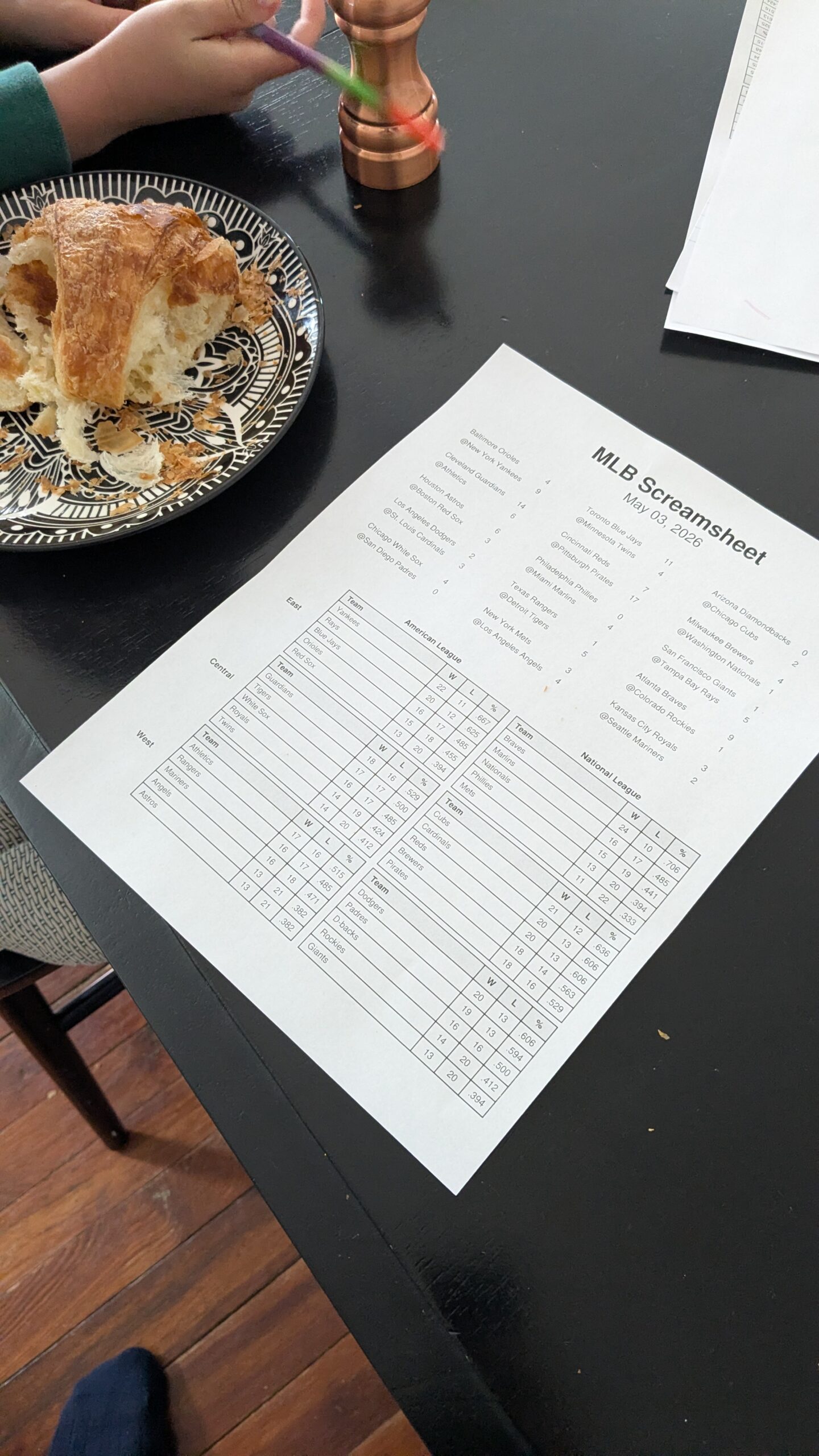
    He’s used to getting a Screamsheet every morning – a one-page newspaper I created for him, that lists yesterday’s game scores, current MLB standings, and a game summary on the back. It automatically prints out at 6am, and answers all his questions.

    But, no printer on vacation.

    So throughout every day, my wife or I needed to consult our phones to get various information for him that he could have just read on his Screamsheet.

    This short article describes how I ultimately solved this problem (though too late for this vacation).

    Dispatch

    I tried running the Screamsheets off on my laptop in the morning, but that kind of wrecks the whole purpose for their existence. I don’t want my kids or me passively consuming screens as soon as we wake up. So, it was clunky at best, and I only did it once.

    If only I could route his 6am paper from my printer to my email for a week!

    Thus was born Dispatch.

    The way dispatch works is, you create two directories on your machine, somewhere stable. Mine are /home/peter/PRINT and /home/peter/EMAIL. You set up a scheduled job (cron on Linux, Task Scheduler on Windows, launchd on Mac) that runs every 5 minutes that checks those two folders for documents. If a document is found in the PRINT folder, print it out immediately, and move it to a processed folder. If it’s in the EMAIL folder, then email it immediately to an address specified in a configuration file.

    Finally, just modify the Screamsheet generator to drop the finished files in either PRINT or EMAIL, and bam, we got a home dispatch system.

    One thing I like about this system is, before, Screamsheet really did two things – build the documents, and then print. Now, the two programs do one thing. One writes the newsletters, the other delivers them.

    Unfortunately, I didn’t get this thing set up until we got back from Arizona. Oh well, next time.

    Solving the Network Printer

    About a week after we got back, my wife was scheduled to go knock heads at our Lower Merion School Board meeting. She’s been a major voice in the “Screens Down, Pencils Up” movement, to limit the use of screens in the public schools here.

    So she calls me at work, and asks how to print her talking points. Our printer is in the basement, connected to a really old desktop running a lightweight distribution of Linux. It’s the kind of computer that has a hard time opening Notepad.

    I’ve tried setting up the network so we can print to this machine’s printer from our laptops, but it just never worked. It’s complicated now that she and I use our laptops for work, so they’re locked down by InfoSec. The way we print is, send an email to my Gmail address, go to the basement, log on to the computer, open Firefox, go to Gmail, open the email, download the attachment, and finally print it out.

    My wife is brilliant, but this 7-step basement printing ritual is objectively absurd. So there she is, asking me what the machine’s password is and what to do.

    We get it done, but it left me thinking: what if I could get the attachment to just download into the PRINT folder?

    BAM an enhancement!

    I set a filter in my Gmail, so whenever an email comes in from a limited set of senders (both of our work and home emails), and is sent to my_gmail+print@gmail.com, it gets taken out of the inbox, marked as read, and given a label Dispatch/print. My print machine now runs a third routine every five minutes that checks that email address for new messages with attachments. If found, it downloads all the attachments to the PRINT folder, and they get printed five minutes later.

    Thus, the network printer problem has been relegated to the waste basket of Peter’s life.

    Extending the Empire

    The next problem I’m working on is delivering my Screamsheet to subscribers. I put up a little summary of the Screamsheet on Reddit a few days ago to some very positive response. A few people expressed interest in getting Screamsheets of their own, so I picked one user to be my guinea pig. Every morning now, I email one MLB and one NHL sheet to him.

    My current work in progress is to set up an added capability to Dispatch’s EMAIL function. I’ll build a special “manifest” folder that contains the completed Screamsheets for the day along with a small manifest.yaml file that has a recipient email address, a subject line, and a body. Dispatch will build an outgoing email with that information, attach the PDFs, and dispatch that lucky person’s news of the day.

    Oh, also, I’m coding all this using GitHub Copilot in Visual Studio Code. Which means, I’m telling Copilot what I want, vetting its plan, and letting him go do his stuff while I practice my guitar. Win-Win.

    Home automation, DIY.

    Please feel free to fork my Dispatch repo for your own uses. If you need help setting it up on your system, please drop me a message in the contact form.

    So what are you building today? Drop a comment below!

    ANNOUNCEMENT

    I’m running a beta-test of my Screamsheet subscription until July 4, 2026. If you are interested in getting one or more of these as a daily email, go fill out this form.

    It’s a live beta test, so expect some bugs and hiccups while things get smoothed out. Any feedback is appreciated.

    Also, full disclosure, after July 4, I’ll start charging a small flat monthly fee for up to five customized Screamsheets daily. Up until then, it’s free though.

  • How I Used AI to Make Technology Disappear (and Saved My Son from “Screen Withdrawal”)

    How I Used AI to Make Technology Disappear (and Saved My Son from “Screen Withdrawal”)

    Mid-year 2025, my son became obsessed with Major League Baseball. He had started playing Little League the year before, and we had seen a couple of Phillies games, but suddenly he was hooked on the progress of the season.

    There was just one problem: my kid is a screen hunter.

    When he wakes up in the morning, he hunts for the TV remote. If he can’t find that, he hunts for the Nintendo Switch. Then the tablet, the computer, my phone, and my wife’s phone. You get the idea. He’s on the hunt.

    We’ve been trying to address this because once he gets on a screen, getting him off is nearly impossible. It usually leads to a “verbally violent” outburst-from him, not us-and he stays a bit of a jerk for a while after.

    My wife and I call it “screen withdrawal,” and with our two boys, it feels very real.

    The baseball scores became a flashpoint. I wanted him to follow the scores; it’s an innocent hobby, there’s math involved, and it’s the National Pastime. But I didn’t want him looking at a screen to get them.

    The “Screamsheet” Solution

    My first workaround was digging into the scores myself and dictating them to him, but that’s a hassle when you’re trying to get breakfast on the table and kids out the door for school.

    Then I tried supervised screen time, but the second I turned my back, he’d drift from baseball highlights into the typical “junk” on YouTube. The algorithms don’t care about your age; they only care about keeping you watching.

    Then I remembered something from my childhood. I used to be into cyberpunk role-playing games-not even playing them, just delving into the worlds they created. I remembered a futuristic item called a “Screamsheet.” The idea was basically a high-tech fax machine: you put in a buck, it prints out a sheet with the latest headlines, you read it, and you toss it away. I thought: Wouldn’t it be great to create a Screamsheet for baseball? A physical page that prints every morning, ready for my kid to read like his own little newspaper.

    Building with the “Vibe”

    I decided I wasn’t going to program this all by myself. I was going to get AI to do the heavy lifting. I fired up Gemini and told it what I wanted: a morning summary of yesterday’s games, who won, the scores, and a chart of the current standings.

    Gemini spit out the Python code. I stuck it in a GitHub repository and started running it. It uses an online API (MLB Stats) to pull the data, assembles it into tables, creates a nicely formatted PDF, and drops it into a folder.

    The last mile was the hardware. We have one Linux box in the basement connected to a printer. I used Gemini to help me write a simple Bash shell script and a “cron job” that tells the computer to run the program and print the file automatically at 6:00 AM.

    The Result: A Silver Bullet

    The first morning it worked, I heard the printer running at 6:00 AM on the dot. I ran downstairs, grabbed the sheet, and put it on the kitchen table. My son came down, saw it, and just started reading while eating his breakfast. He didn’t say a word, but he also didn’t hunt for a screen.

    Then he told me “Dad, the Brewers are the top team” (he likes poking at my Wisconsin heritage).

    But I didn’t care about the Brewers at that minute – Team Parents had won this game!

    Since then, I’ve embellished it. If the Phillies played, the back of the sheet now features a full box score and a “journalistic blow-by-blow” generated by the Grok API.

    I even modified the prompt to match my son’s morning mood: if the Phillies (or whatever team you pick as your favorite) lose, the AI is instructed to write the summary like a local fan who is absolutely fed up-just totally throwing the team under the bus and ready to chuck a cheesesteak at the wall. Matching his “energy” has actually helped my boy commiserate and get a kick out of the loss instead of just losing it himself.

    Expanding the Feed

    Once the season ended, I kept the habit going with MLB trade rumors so he could read about how teams were transforming in the off-season. Now, I’ve expanded the system to include:

    • NHL and NFL scores.
    • The Presidential Screamsheet: A morning scan of news sites and WhiteHouse.gov, summarized by AI into stories under 200 words.
    • The Sky Tonight: A front-page star chart with an LLM-generated “reenactment” of Star Hustler’s Jack Horkheimer describing the night sky, plus horoscopes for my wife and me.

    Making Technology Invisible

    The point of all this is that I’ve taken advanced technology – Large Language Models – and used them to make technology disappear. Instead of sifting through an infinite scroll of noise and being held hostage by an algorithm, we’re reading good old-fashioned paper. The computer is now an invisible aspect of our morning.

    This personal project actually mirrors a larger movement happening in my own community right now. My wife has been active in the Lower Merion School District board meetings, where a growing group of parents is pushing for a “Bell to Bell” phone ban and the right to opt-out of 1:1 tablet use in favor of Pencils Over Pixels.

    My goal is to use AI to make technology as invisible to my eyes as possible so I can regain my concentration and attention. I can force these tools to give me exactly what I want to see and hear, and nothing else.

    I’ve posted the link to the code below. It’s all on GitHub – feel free to fork it and make it your own. It includes architecture diagrams and READMEs so your own LLM can read the docs and help you extend it to whatever you’re interested in.

    If you have questions on the setup or suggestions for new sheets, drop a note in the comments!

    Screamsheet

  • Blocked Writers Still Must Write

    Blocked Writers Still Must Write

    I was supposed to have a new article out this morning, and a newsletter last weekend. Clearly neither happened.

    The big reason is this. I set myself the task of lining up two informational interviews at my last newsletter. I tried to set one up and crickets. So, I got embarrassed, because I don’t have any results to report.

    But, that doesn’t mean I get let off the hook! You, dear Reader, still deserve something!

    As Julia Cameron says, it’s much harder to be a blocked artist than to just do the work. So I’ll write about what I’ve been thinking about.

    Before getting in to that, I have a request for YOU, dear Reader. If you are enjoying this blog, and have anything you would like me to write about, please either comment on this article, or just email me at distractedfortune@gmail.com.

    Without further ado, here we go.

    The Minister

    I go to church kind of regularity. Well, I have a church I go to when I can. The ministers send out emails every day with a reading, their analysis, then a prayer.

    The latest one that got me was about the difference between how Paul presents Jesus, versus how the gospels present Jesus.

    One way to look at the meaning of Jesus in our lives is, live like him. This is the Jesus of the Gospels. He was a great man who did great things, cared about the poor, and taught about God. You should walk in his footsteps.

    Paul presented a different version though. He didn’t talk about how Jesus lived, only how he was resurrected. The Post-Crucifixion Jesus.

    My minister said he once thought the New Testament should be laid out in the order in which they were written – Paul wrote his letters first, and the Gospels came much later.

    But why didn’t Paul describe how Jesus lived? I know that about half way through his ministry, the Jewish Christians who followed him were getting a little frustrated waiting for Jesus to come back, the so-called “Second Coming”. So, Paul pivoted his teachings to make it a spiritual second coming. Probably, Paul was a little frustrated too.

    The Campground

    My older boy had a school camping trip this past weekend. I went too as chaperone, and also because I like to camp.

    At one point, I got to talking with the principal of the Lower School. Somehow, I got to talking about this dichotomy of the two Jesuses, and he revealed that he was part of an Eastern Orthodox church. Antiochan (Syria) to be exact.

    He told me a little about the Great Schism of 1054 AD, when the Eastern Orthodox Christians split from the Western, mostly Roman Catholic Christians.

    That was all from him. So I did a little digging on my own.

    Here’s what I found, along with my conspiracy theories. Please do your own follow up research, and don’t just go on my word. Imagine this is right up there with “Drunk History”.

    The Schism

    Jesus was crucified. The story is that he rose from the dead after three days, appeared to a few believers after that, then flew away at the beginning of Acts.

    Jesus was crucified by the Roman Empire. Herod was a lower Roman governor, and Pontius Pilate was his sheriff in Jerusalem.

    Why was he crucified? As an example to the rest of the Jews who had started to follow him. Don’t challenge the authority of the Emperor – no revolts or alternative kings of the Jews.

    After that point, the Christians were a thorn in the side of the Roman Empire. You just couldn’t kill and feed them all to lions! Especially with Paul running around, organizing the churches that Peter set up, explaining to people why the resurrection was so important.

    So, after a while, if you can’t beat them, join them. Or rather, usurp them.

    Emperor Constantine saw a golden opportunity in a stupid argument a bunch of the christian leaders were having. Was Jesus God, or was he the Son of God?

    To settle this once and for all, and for the greater glory of Rome, Constantine convened the Council of Nicaea. At this council, all the bishops hashed it out until they came to an agreement. Well, not exactly an agreement. They came to a point where a strange contortion of language was created, and codified in what we now call the Nicaean Creed – The Son is Consubstantial with the Father.

    The Nicaean Creed reads kind of like a legal document, which it was. It basically decreed an answer that didn’t really solve the problem, and was not agreed on by all parties. Specifically, the Eastern Christians didn’t really buy the argument.

    At the same time, Constantine moved the center of his empire to Istanbul, named it Constantinople, and ordered that the Western empire would forever and henceforth be ruled by a Pope.

    A Pope with an army.

    This lasted until 1054. In that year, the western Pope excommunicated the eastern Patriarch, and the Patriarch responded by excommunicating the Pope. And a great supernova was recorded in China, which lit up the night like a sun for two whole days.

    Venice

    In the middle of all this was Venice, who operated maritime trade routes between the East and West. They saw in this conflict a great opportunity, like the Roman Emperor before them.

    It may be noted that the appointment of Pope to be supreme ruler of the Western Roman Empire by Constantine, the “Donation of Constantine”, was discovered by some Renaissance collaborators of Nicholas of Cusa to have been a hoax. Most likely, a hoax sprung and used by Venice to ensure the world was engulfed in permanent conflict in which Venice itself could profit.

    In 828 AD, some Venetian merchants nicked the remains of St. Mark the Evangelist (of “Gospel of Mark” fame), and brought them to Venice. The Venetians quickly claimed St. Mark as their patron saint, and declared independence from both the Western and Eastern churches. Hence, they could operate independently of both, and as a go-between.

    The financiers of Venice who profited from the trading manipulated both sides to be always at battle, weakening each other while enriching Venice. Without this split between the two sides, Venice could not have grown as a neutral financial power in the region.

    Today

    I don’t think Pope Leo is an agent of Venice, but I do think the schism was a crafty way to split and weaken the power of Christianity. Personally, I’m more Episcopalian than Catholic. But I’m not above thinking that somewhere in the Catholic church still lives a vestigial belief that their authority over Christendom was bestowed directly by a God-Emperor.

    What does all this have to do with getting rich while repeatedly failing less and less catastrophically? It’s important to let your imagination wander now and then, because it helps to feed your soul. Who knows why we tend to obsess over ideas that appear to have little bearing on the immediate pressures of the day?

    I tend to think those urges to find out more come directly from the Great Creator himself, in the form of a little voice. Follow those urges. Take care of your business, but follow your curiosity and turn it into some kind of expression that others can enjoy.

    Also, maybe, we can take a little lesson from despicable Venice. There are massive flows of money in our world right now. It takes some creativity and chutzpah to tap into those flows with a well placed side hustle. But there’s enough flowing for everybody.

    So how about you? What’s one manual process at your job or in your life that you find tedious but necessary? Somebody else may find it so as well, and might pay for a solution you invent to automate it.

  • This One Ability is a Superpower, and You Already Have It

    This One Ability is a Superpower, and You Already Have It

    Imagine a world without keyboards. A world where keyboards are used rarely only by specialists, like a court reporters stenograph or a draftsman’s compass.

    While keyboards are found in every home, workplace, and now school backpack, I think this is going to look antiquated in about a decade.

    What will replace them? Your own voice.

    Sure, you’ve used dictation software before, like Nuance, your phone’s voice recorder, and it all just kind of sucks. Lots of umms, lots of errors and random punctuation thrown in while you pause and think.

    But just try an experiment. Take out your phone right now. Find your recording app (Voice Memo on iPhone, Recorder on Android), hit Record, and just describe something you’ve been working on. Some life problem you’ve been trying to solve. Like, who’s driving the boy to baseball tonight, since both you and your spouse are busy. Talk a lot. Repeat yourself. But record it.

    Now, take the transcript (both apps automatically generate this), copy it and paste it into your most or least favorite LLM. I usually use Google Gemini, but ChatGPT, Claude, or Grok are fine too. Paste your transcript, hit Enter, and watch what happens.

    If you’re like me, that first experience ruins the keyboard.

    This is the wave of the future, and good riddance. Your voice is one of the most miraculous parts of you.

    “I hate my voice!”

    I’m biased. I think humans are separate and above the animals as a creature, and special in the universe.

    My bias started growing long ago, but really solidified during my decade with Lyndon LaRouche. One of the things we did that in hindsight looks pretty culty, was sing. We would strive to do a voice warm up every morning as a group, and would practice singing Bach and other classical songs several times a week. Then, we would get together next to one of our tables that howled “9-11 Was An Inside Job!!” and sing beautifully to the passersby.

    There were many reasons to sing. For example, it got us used to working together to make something beautiful. It also helped strengthen our vocal cords to talk to a hundred people a day, sometimes over loud traffic and other background noise.

    But the main reason we sang is because, as humans, we use our voice to communicate ideas. Singing was a way to teach each other the mechanics of how our voices do that.

    Ideas are objects that animals just can’t understand. Maybe they can sense there’s something there, but not as anything more than “there’s something wrong” or “boss is happy”. But you can’t explain something like justice to a dog.

    We use our voice to communicate those ideas. Chimps use their voices too, and they do it to express themselves and their needs. But ideas are not sensible objects. They are only sensed in your mind.

    I don’t know if our physical vocal instrumentation was specially designed for communicating human ideas, but it fits the purpose really well. A lot of our ums and ahhs are there because we don’t know what to say next. But some are there because they’re supposed to be. It’s those pauses and inflections that don’t have to be there, that we use to “get the idea across”.

    When you speak (or sing), you’re creating sensory stimuli intentionally, to create patterns of sensory stimuli on the sense organs of the listener. That listener can pick up on the sounds or silences that aren’t supposed to be there, and use those clues to regenerate YOUR idea in THEIR minds.

    When done well, we get forms of art like poems and songs. Percy Bysshe Shelley wrote a pamphlet a couple hundred years ago called “In Defense of Poetry“, where he claimed that the earliest form of human language was poetry. We were testing this vocal tool’s ability to describe things that had never been described before. So, concepts that had no words yet, could still be described using this special ability of the human voice.

    AI thirsts for your voice

    Did you run that little experiment above, and drop the recording transcript into your LLM de jure?

    If so, you’ll find the response is vastly more rich than what you get when you type a prompt. I can bullshit about why this happens, like how attuned the LLM is to tiny details like punctuation, etc etc. But I think the main thing is, when you speak, you tend to follow the natural contours of thought. You’re more likely to say some detail that wouldn’t make it into your typed prompt. You might even just go down a tangent you wouldn’t have expended the finger effort to explore.

    All that extra context you provide gives the LLM so much more information to work with. Neither I nor anybody else really knows what’s going on in these models when you give them a prompt. We can wave our hands about “just spits out the statistically most likely next phrase”, and other derivations from the true logical design of these systems.

    However, even if that’s the case, speaking ideas out loud naturally and necessarily incorporate concepts that just don’t typically go together, and that a logical system certainly wouldn’t “think” to string together. This makes the output of the LLM become something like a novel, rigorous extension of your paradoxical idea concept to limits you haven’t taken the time to explore. And it does this in seconds.

    And, sometimes, it’s just quicker to say “Hey Google, put garbage bags on my grocery list in Keep” than to type it. That’s also a big win.

    People were not designed to type words on a device. We were meant to speak them into existence, and these new models make a return to that existence possible.

    End of the Keyboard

    The keyboard was a compromise – a mechanical bridge that allowed us to communicate with dumb machines. But those machines can now speak Human, and understand the intent of what we’re saying.

    As we move toward a world without keyboards, we move into a world where we can reclaim the oral tradition that Shelley and the other poets championed. We are speaking our ideas into the world, one messy miraculous word at a time.

    So open your recording software, take your hands off the keyboard, and speak a comment below. The AI will clean up the mistakes.

  • How to Build a Real Network

    How to Build a Real Network

    While wintering in Vermont this past New Year’s Day, I built a product that all the LLMs told me would sell like crazy.

    Each year, all publicly traded companies file a report with the SEC affectionately called the 10-K. It’s a document packed with lawyerly language intended to comply with federal regulations while keeping all company hopes and fears secret.

    One section, Item 1A, lays out all the risks the company foresees in the coming year. For example, all companies that deal in physical products saw risk in the Trump Tariffs last year. Some companies don’t see any risk, and they’ll say that.

    Because these companies are all joint stock companies, they’re afraid of the stock owners pulling cash due to perceived weaknesses. Therefore, the Item 1A reads a bit like a script from the Netflix series Succession – lots of words, maximum ambiguity.

    One big analyst job at hedge funds and other investment houses is to compare these sections year over year for a given company, and identify subtle differences that betray underlying problems or strengths. These risk factors then inform the next investment steps in that company.

    But it’s tedious work.

    Enter: SigmaK

    I built a system that uses a vector database and an LLM to hunt down differences automatically. It took about a month of evenings working with GitHub Copilot to build a working system. A few weeks ago, I sent example reports to a few people and put up a LinkedIn post about it.

    And there I sat, with a vector database full of insights and a LinkedIn notification tray that stayed stubbornly empty. I hadn’t built a solution; I’d built a monument to my own assumptions.

    The lesson was clear – don’t build something that you’re not certain people want.

    New Plan – Same as the Old Plan

    While asking Gemini, ChatGPT, Grok, et al. for new ideas this past week, I got frustrated by how many times they suggested a variation of “compare 10-k filings year on year to identify risks”.

    People don’t want this! At least, I do not know anybody who wants it!

    Fed up, I decided to instead come up with a strategy for growing my professional network into a potential client list. The core of the networking strategy is to hunt for problems.

    Long time reader(s) of Distracted Fortune (you know who you are, Rutiger) will remember that one of my first posts was on Digging for Problems. Well, the new plan is a more refined and targeted version of that, minus the hard rock mining component.

    The Cycle

    Being highly motivated for about 10 minutes a day, and highly distractable all other times, I needed a system that would be low friction, cumulative, and atomic.

    I worked with all the LLMs critiquing each other to come up with my current plan.

    (Side Note: The different AIs have distinct personalities. Most are friendly enough, but OpenAI’s ChatGPT acts like the overachieving older sibling who can’t help but criticize everyone else’s homework. It spends three paragraphs telling me where the others messed up, only to give me the same answer. It’s quite judgy.)

    On Monday, I’ll spend about 30 minutes scouring LinkedIn, Reddit, and X for key words like “manual process”, “old excel”, “manual entry”, “tedious”, things like that. When I find a person talking about a new problem, I add two Issues to my GitHub repo: a Person issue and a Problem issue. To link a person to a problem, I’ll write the Problem issue number (e.g. #22) on the Person card.

    Two days (and ideally two problems) later, I’ll send a “zero-ask” email to the new people. The email basically says “Hi, I’m researching operational pains in [your business domain]. What’s one manual process you currently have that feels too brittle to touch?” The text of the email is added as a comment on their Person card.

    Finally, two days later – Friday, if you’re counting – I’ll send a “technical gift” email. Whether my new contacts sent a reply or not, I’ll send them one sketched out solution to one of their problems. “I’ve been thinking about your process, and came up with this solution. No need to reply, just thought it would help!” It doesn’t even have to be a built solution, just a summary of how to handle it. This isn’t a software license; it’s a blueprint. It’s me saying, “Here is the math you need to solve this.” It costs me twenty minutes of thinking and costs them zero minutes of onboarding.

    GitHub has a thing called “Projects“, which looks and acts a lot like a Kanban board. You might have seen these things in Jira, Trello, Monday, Asana, or some other productivity app. Basically, it’s a set of columns, with notes you can move between those columns. Think, PostIt notes on a white board that you can move around.

    My issues are those notes, and I have columns like “Discovery”, “Problems Validated”, “Warm Contact”, “Garbage”, etc. I’ll move them around as I send out emails, to keep track of which ones are in what phase.

    Wash, rinse, repeat, each week, for 6 months or so.

    The Goal

    Ideally, by the 6 month mark, I will have reached out to around 50 new people about a few dozen types of problems, and have gotten at least a few responses. Those responses will be added as either new problem issues or comments on the Person issues. And the issues will be arranged in my Project board to clearly identify what’s hot and what’s not.

    Some responses will be a variation of “piss off”. But if even one of them is a positive response to an existing problem, I’ll reach out again and see about building the solution.

    More likely, I’ll have identified a few problems that span multiple people. And voila, I have not only a new viable product, but I’ll also have an initial client base of people that will very likely pay cash dollars for the product.

    However, as sage Mike Tyson points out, “everybody’s got a plan until you get punched in the mouth.” It’s time to put the strategy to the test of action.

    Do you have a plan to build a network or get product ideas? If so, please leave a comment.

  • Use AI To Get The Fire Blazing

    Use AI To Get The Fire Blazing

    Disclaimer: this post contains affiliate links. If you click on them and buy the products, I’ll get a cut of the profit. They’re good products!

    This post is pretty much going to be a list of ways I use AI in my general life, which I do every day. I’ve found these programs to dramatically help me overcome blocks, get things done, and make sense of my world.

    I remember when ChatGPT first stormed the ramparts back in 2022. I felt great apprehension, that they would steal my creativity and render myself just a stick of meat.

    However, when I first started creating this blog, I got hooked. I certainly wrote all the articles, but I used the AIs to get things over the goal line. Whenever I got stuck writing or looking for ideas, I would just paste my draft and my frustrations into Google Gemini, and it would IMMEDIATELY spit out ideas.

    In fact, the name Distracted Fortune came out of just such a brainstorming session. I told it who was the target audience (you, dear reader!), and what the intended story was, and then demanded 25 short titles. Over and over again. I don’t remember it ever coughing up exactly “Distracted Fortune”, but the ideas it did spit out led to the title.

    The main ways I use these programs is to generate ideas, research products, overcome blocks, stay on task, and of course, write programs. I’ll go over each in turn.

    The AI Toolbox

    There are a few AI chat bots you could turn to. I find they each have their strengths and weaknesses, their own personalities. Here’s how I choose:

    1. Google Gemini

    This is the generalist, my first stop. I have a few specific prompts stored in its memory so it can refer to specific aspects of my life and travails when answering questions. It can also search the web, save things in Google Keep, adjust or check my Google Calendar, and integrate with my Google Home smart devices.

    Also, full disclosure, I have a premium account here because I pay for Google Storage. So, you might not get as much mileage with Gemini as I do.

    1. Grok

    Grok is like my crazy conspiracy theorist buddy. It has realtime access to all of X (nee Twitter), so it’s my primary news source. I go here if I need a rundown on a specific story.

    1. Github Copilot

    This is my programming buddy. I have it integrated into my Visual Studio Code, so I can tell it what I want a program to do, and it will just write it all up for me. It’s also available directly on GitHub, where it can review my code repositories, create issues, and do other programmy things.

    1. ChatGPT

    I use this one mostly at work. It’s also a generalist, can search the web, and give me code snippets. However, I find it has the ability to think a little deeper than the other three. Really, I just use it as a different voice in the pack.

    Sometimes, if I don’t trust an answer from one of these, I will put the whole conversation into another. I recently reorganized my whole family finance review system, and had to shop the discussion back and forth to all four of these.

    Generate Ideas

    “Hey Program, give me a few ideas for a date with my wife next Friday, during the day.”

    Yes, I have a bit of a date palsy. But Gemini does not! Within moments, it will hunt through Maps to find locations open on the day and time within walking distance, see if they’re open, and see if any of the places have something interesting scheduled. Then, it will list them out, along with suggestions how to make each spot extra fun.

    You see, these programs don’t have emotions, so they don’t get hung up on the emotional weight of the ideas. They just get automatically generated.

    Research Products

    “Hey Program, I want a watch I can wear at night so I can see what time it is. Should be big enough so I can see the time without my glasses, track my sleep, and be cheap as hell. Give me three options.”

    Bam! Three options in three seconds. No more scouring product reviews and “here’s some random junk available on Amazon right now” sites. The LLMs will give a few leads right away, especially if you tell it a LOT about what you’re actually looking for. Remember, these programs have context windows that can hold around 100,000 words. They remember your entire conversation.

    Tell it what you’re looking for, criticize its first, second, third tries. You’ll eventually get to whatever you were looking for out of the billions of possibilities.

    (I ultimately got an Amazfit Band 7)

    Overcome Blocks

    I started writing this article about five times. Finally, I put my fullest draft into Gemini and told it I thought it just wasn’t going in the right direction, sounded too self deprecating, and needed to change. It suggested I cast AI not as a crutch, but more like “an exoskeleton” that accentuated my abilities. Then, it gave me a few ideas for an introduction.

    I didn’t actually use any of those introductions, but it got me moving on the current draft.

    If you’re ever having trouble starting something, just tell the LLM what’s going on, and you need some help. Sometimes, all you really need is a few novel ideas to get moving.

    Stay on Task

    Most LLMs have some kind of memory storage, where you can make it remember important details about you so you don’t have to repeat every time you return.

    Back when I was building my SigmaK annual filing program, I realized too late that I hadn’t pitched it to anybody yet, and I’d sunk a lot of time into it. After breaking down, gnashing my teeth, shaking my fist at the sky a few times, I came up with a new idea. I had Gemini help me come up with a memory it could store, which we call both “Prime Directive” and “Golden Rule”.

    Every three prompts, Gemini must warn me that I’m going down a research hole, and then ask me what person I will discuss the topic with. “No idea is finished until it’s tried on a real person.” It’s annoying, but it does get me to move and talk to people as a first step now.

    Write Programs

    My boys are into baseball. They’re also into screen time. Their parents are into NO screen time.

    After spending a few mornings prying various devices out of my oldest kid’s hands, I came up with an idea. His “foot in the door” was to explain he just wanted to check the MLB standings from the day before. I decided to write a program that would print out the standings on paper every morning at 6am.

    Out of that thought, the Screamsheet was born.

    Really, I had GitHub Copilot write the program for me. It’s since expanded from baseball scores to hockey scores, MLB news, and political news (for Dad). I even have the Grok API summarize games for me. You can see the code here.

    AI is a Life Lever

    The reason for this post isn’t to get you to use a new program. It’s to use a special kind of program to get more effective in the real world.

    I don’t talk to Gemini to keep talking to Gemini. I talk to Gemini, so I can be more present with my kids, talk more clearly with my wife, and have better control of where my money goes.

    Use these things as tools. These programs are what we always hoped search engines would be: a way to cut through the noise and find the signal.

    Now, time to put down your phone and go do something interesting.

    If you liked this article, please leave a comment below, share it with someone you know, and get on my email list!

  • And The Least Worst Accounting Software Is…

    And The Least Worst Accounting Software Is…

    All electronic systems of accounting suck, unless you make more than enough money to cover the bills.

    My first major attempt at keeping the books was with a vast spreadsheet system. You know, like Mister Money Mustache.

    I broke a wide sheet into 52 chunks to represent fiscal weeks – they start when I get paid. Each chunk had a balance rolled over from the previous week, and sections for upcoming income, regular bills, expected costs (like upcoming car repairs), and some other categories.

    Each week, I would download all the line items from my bank website, and distribute them among all these categories. Then, I’d work it until the balance on my spreadsheet was equal to the actual bank balance.

    Rarely did it add up. And rarely did the process take less than 2 hours. And rarely did the result line up with my predictions.

    I tried to speed the process up a few times with functions to automatically categorize things, but still, it was a tedious mess that only kind of worked, and absolutely stressed me out.

    Wishing there were an easier system, I remembered an earlier experiment with Mint back in the day, which did everything I wanted. Mint went bust, so I found the next best thing – Simplifi.

    The Gap

    Back when I was an elite member of the prestigious Lyndon LaRouche gang, I studied a lot of math. We all did. Half of every paper LaRouche wrote was about math. Really, about how math is an inherently flawed model of the world, and dependence on (or “worship of”) math had led to major economic problems. And war. And sexual impotence. And a bunch of other bad stuff.

    I think, in essence, he’s not wrong.

    Here’s how it works. In math, you have a bunch of statements of bulletproof truths. Those truths are derived logically according to the Rules of Math, from other more fundamental truths. Those more fundamental truths are likewise derived from yet more fundamental truths, and so on, all the way down to a set of truths that can’t be derived from anything else – the axioms, postulates, and definitions.

    But whence this Triumvirate of Truth?

    Well, that’s debatable. We hope the come straight from The Book. That they’re the rules God used when He separated the Light from the Darkness. That they’re the true building blocks of nature.

    However, they are NOT handed down from the Creator. They’re invented by people, usually in order to make the later derived proofs work out. And, in the history of math, we’ve identified a few that are just wrong. For example, Euclid’s parallel postulate.

    So what do you get with a set of theorems proved true, according to an invented set of axioms, postulates, and definitions? You get Star Wars. Or Star Trek.

    You get an approximation to a real world, but not the real world itself.

    There’s a gap. It’s our job not to keep doing proofs on a system that’s inherently an approximation, but rather to find the places where the Real World gives a result that contradicts one of those proved “truths”.

    It’s at that spot, where a new discovery lies in wait. Like Einstein’s theories of Relativity, which incidentally came directly out of the recognition that Euclid was wrong on parallel lines.

    So this brings us back to Simplifi.

    Simplifi, or whatever, is the least worst

    None of these big accounting apps can map the real world exactly. They MUST go off the rails at some point, and require human intervention.

    The least worst accounting software is whatever sounds good to you in about 15 minutes of searching on the web. I like Simplifi, so you can start there if you want.

    You have to be ready to think it sucks after a few weeks of using it, learn how to spot what’s not working, and then figure out how to hack it into something that works better for you. In the end, it’s going to be something of a kludge built off of whatever you first downloaded and installed. But, it will be your kludge.

    The software will not bridge the Gap for you – you will have to build that bridge yourself.

    Here are some hacks I’ve learned with Simplifi, to make it more my own:

    1. Rules, Rules, Rules

    In order for the Reports to work the way you need, you need to set up rules. In the beginning, for every transaction that isn’t some one-off ATM stop, create a rule.

    To do so, click on a transaction, then click on “Create Rule”.

    Your list of transactions
    Your list of transactions

    Information about a single transaction
    Information about a single transaction

    Here, you generalize the keywords Simplifi uses to identify the transaction in the future, give it a nice name you like, and configure all the things you want Simplifi to do when it sees one. For example, maybe you guys get pizza every Friday, and you want that categorized as “Entertainment”.

    Creating a new rule. Get rid of a bunch of the suggested keywords, or it will be too specific to be useful
    Creating a new rule. Get rid of a bunch of the suggested keywords, or it will be too specific to be useful

    After you hit “Continue to Review”, you have the option of running the rule on all past transactions that fit the pattern. Do it!

    Review the rule, and make sure to run rule on all previous transactions
    Review the rule, and make sure to run rule on all previous transactions

    In this way, you are training Simplifi how to read your transactions properly.

    1. Set Recurring Bills and Income

    If a transaction happens more than once, consider it a bill. Click on the transaction (see the pattern?), and hit “Mark as Recurring”.

    Another transaction - Mark as Recurring is in upper right corner
    Another transaction – Mark as Recurring is in upper right corner

    Tell Simplifi how often this one happens, and when it usually happens, and how much it usually is.

    Settings for a recurring bill, or income
    Settings for a recurring bill, or income

    When you mark regular bills (like your weekly pizza night), you can see how these hit your future cash flow. To see your projected cash flow, either click on one of your accounts in the Dashboard, or click on Bills & Income, and then Cash Flow. Pretty neat huh?

    Oh, make sure to also mark any paychecks as Recurring.

    1. Use Categories and Tags for Reporting

    Each transaction can have one Category, but multiple Tags. For the past couple weeks, I’ve been going in and manually marking each transaction with one of two tags: Want and Need.

    When you go to Reports, now you can see the breakdown of what you spent last month based on category, or tags. For example, last month, I found out we spend a quarter of our income on Wants!

    Reports are awesome. This one looks at my custom tags.
    Reports are awesome. This one looks at my custom tags.

    The point is, you need to think about these apps like they are pets. Computer programs are inherently not models of the real world. But, by training them, you can make them a little more useful for you.

    If you liked this article, please leave a comment below, share it with someone you know, and get on my email list!

  • Reviving a Dead Blog: My New Strategy

    Reviving a Dead Blog: My New Strategy

    It’s been a couple months since I published anything on here.

    I’m back.

    Here is the plan.

    The Web Log

    I’m not going to push for 1000-1500 word self-help guides anymore. Instead, I’m going back to the roots of the blog form.

    For now, I’ll shoot for 250-500 words instead, and talk about what I’ve been up to. Things I’ve tried, things I’m working on, failures I’m trying to learn from, and other subjects that end in prepositions.

    For example, I spent winter vacation in Stowe, Vermont, working on a product to sell to small hedge funds. It’s a report that compares annual SEC filings from companies to their prior-year filings, to identify any new or deprecated risks.

    I’m still working on it, and kind of shipped a version of one to a hedge fund guy. He never responded, and I put the kibosh on the project.

    Why?

    Because I’m committing to a different strategy now. Ship first, build second. I should have ham-fisted a report with my own eyeballs and fingers first, before trying to build a computer system to do it. Then, ship that and see if there’s any interest at all.

    If there’s no interest, why waste the time banging out code!?

    Mailing list

    Besides maintaining an exciting log of my weekly foibles and follies, I’ll send out a weekly email with my latest thoughts to you lucky subscribers. No more random links, no 1500 word manifesto. Just me, sharing what’s working and what’s not, as I build in public.

    So, put down your drink, enter your email address, and hit Subscribe.

    Thanks for reading. See you next week!